Droid Calc
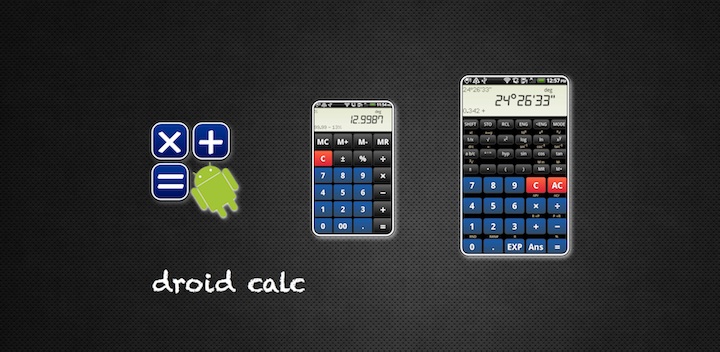
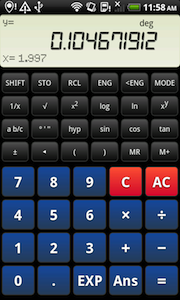
Droid Calc is our awesome, super fast easy-to-use full-fledged calculator which we especially designed for Android.
The app shares many features with old school calculator:
it comes with decimal, sexagesimal, exponential and fractional displays. It performs arithmetic,
trigonometric and logarithmic functions. It knows about permutations, combinations and coordinate
conversion. And you have 7 memory cells to store your results.
Choose the way you want to input arithmetic expressions. With input method "infix" you can type "sin 45".
You would type "45 sin" if you prefer the old-style input method.
While old school calculator is optimized for the iPad, Droid Calc is made for Android:
- It's super fast and has an awesome responsiveness.
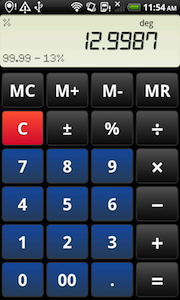
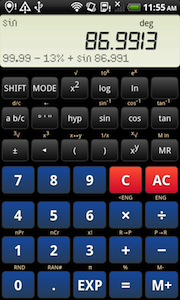
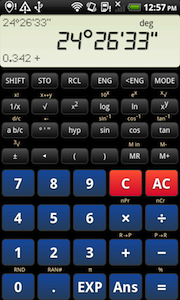
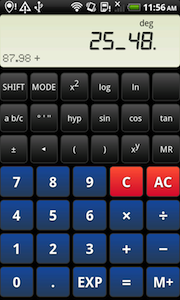
- Swipe the display and switch seamlessly between 4 different scientific skins and one basic skin.
- The layout adapts itself to different device configurations.
- It makes use of Android specific features, such as haptic feedback, or the standard
menu button.
Really simple input
Droid Calc knows about precedence rules.
Example: 10 + 2×6 - 15 ÷ (1 + 2) = 17
| input |
display |
|
1
0
+
|
10. +
|
|
2
×
6
-
|
22. -
|
|
1
5
÷
(
|
( 0.
|
|
1
+
2
)
|
3.
|
|
=
|
= 17.
|
The following examples use a shorter notation.
Instead of 10.25 you would type
10.25.
Droid Calc accepts algebraic (infix) and old-style input methods.
You can set the input method to be used on the settings menu.
An example with algebraic (infix) input method: √2 ÷ cos -45° = 2
√2÷cos45+/-== 2.
The same example with old-style input method: √2 ÷ cos -45° = 2
2√÷45+/-cos== 2.
Number input
| Category |
Example |
|
Input |
| rational numbers |
0.3 |
|
.3 or 0.3 |
| negative numbers |
-4.7 |
|
4.7+/- |
| exponential notation |
3×10² |
(=300) |
3EXP2 |
|
-5.2×10³ |
(=-5200) |
5.2+/-EXP3 |
|
-8.3×10⁻⁴ |
(=-0.00083) |
8.3+/-EXP4+/- |
| pi |
π |
(=3.141592653...) |
EXP |
| fractions |
2/3 |
(=0.666666...) |
2a b/c3 |
|
5 1/4 |
(=5.25) |
5a b/c1a b/c4 |
| degrees |
5° 20' 30" |
(=5.341666...) |
5° ' "20° ' "30° ' " |
Functions 1
argumentfunction
For these functions you enter the argument followed by the function key.
|
Function |
Example |
Input |
Display |
| 1/x |
Reciprocal |
2-1 = 0.5 |
21/x= |
0.5 |
| x2 |
Square |
32 = 9 |
3x2=
|
9. |
| x! |
Factorial |
3! = 6 |
3SHIFTx!= |
6. |
Functions 2
Droid Calc comes with 2 input methods: algebraic (infix) and old-style.
You can set the input method to be used on the settings menu.
algebraic (infix) input method
functionargument
Modern scientific calculators often use algebraic (infix) input method.
For these functions you press the function key followed by the argument if the
input method is set to algebraic (infix).
|
Function |
Example |
Display |
| √ |
Square root |
√9 = 3
√9= |
3. |
| 3√ |
Cube root |
3√27 = 3
SHIFT3√27=
|
3. |
| log |
Common logarithm |
log 100 = 2
log100= |
2. |
| 10x |
Powers of 10 |
102 = 100
SHIFT10x2= |
100. |
| ln |
Natural logarithm |
ln 10 = 2.302585093
ln10=
|
2.302585093 |
| ex |
Powers of e |
e2.302585093 = 10
SHIFTex2.302585093=
|
10. |
sin
cos
tan |
Sine, cosine, tangent |
sin 30° = 0.5
sin30= |
0.5 |
sin-1
cos-1
tan-1 |
Arc
sine, cosine, tangent |
asin 0.5 = 30°
SHIFTsin-1.5= |
30. |
hypsin
hypcos
hyptan |
Hyperbolic
sine, cosine, tangent |
sinh 5 = 74.20321058
hypsin5= |
74.20321058 |
hypsin-1
hypcos-1
hyptan-1 |
Inverse hyperbolic
sine, cosine, tangent |
sinh-1 74.20321058 = 5
SHIFThypsin-174.20321058= |
5. |
old-style input method
argument function
Older, more basic calculators often use this input method.
For these functions you enter the argument first and then
press the function key if the old-style input method is set.
|
function |
example |
display |
| √ |
Square root |
√9 = 3
9√= |
3. |
| 3√ |
Cube root |
3√27 = 3
27SHIFT3√=
|
3. |
| log |
Common logarithm |
log 100 = 2
100log= |
2. |
| 10x |
Powers of 10 |
102 = 100
2SHIFT10x= |
100. |
| ln |
Natural logarithm |
ln 10 = 2.302585093
10ln=
|
2.302585093 |
| ex |
Powers of e |
e2.302585093 = 10
2.302585093SHIFTex=
|
10. |
sin
cos
tan |
Sine, cosine, tangent |
sin 30° = 0.5
30sin= |
0.5 |
sin-1
cos-1
tan-1 |
Arc
sine, cosine, tangent |
asin 0.5 = 30°
.5SHIFTsin-1= |
30. |
hypsin
hypcos
hyptan |
Hyperbolic
sine, cosine, tangent |
sinh 5 = 74.20321058
5hypsin= |
74.20321058 |
hypsin-1
hypcos-1
hyptan-1 |
Inverse hyperbolic
sine, cosine, tangent |
sinh-1 74.20321058 = 5
74.20321058SHIFThypsin-1= |
5. |
Functions with two arguments
argument 1functionargument 2
|
function |
example |
display |
| xy |
Powers |
23 = 8
2xy3= |
8. |
| x√ |
Roots |
7√128 = 2
7SHIFTx√128= |
2. |
| nPr |
Permutations |
6 nPr 3 = 120
6SHIFTnPr3= |
120. |
| nCr |
Combinations |
6 nCr 3 = 20
6SHIFTnCr3= |
20. |
| R→P |
Rectangular to polar
coordinate conversion |
x=3, y=4: 3 RP 4 = 5 (r), 53.13010235 (θ)
3SHIFTR→P4= |
r = 5. |
|
|
SHIFTx ↔ y |
θ = 53.13010235 |
| P→R |
Polar to rectangular
coordinate conversion |
r=2, θ=60: 2 PR 60 = 1 (x), 1.732050808 (y)
2SHIFTP→R60= |
x = 1. |
|
|
SHIFTx ↔ y |
y = 1.732050808 |
Percentage calculations
You can set the kind of percentage calculation to be used on the settings page
(gear in top right corner).
Percentage calculations - advanced
Modern scientific calculators often use this kind of percentage calculation. The advanced percentage
calculation answers several questions easily.
19% of 120 = 22.8
120×19SHIFT%
22.8
Percentage of 80 represented by 25 = 31.25%
25÷80SHIFT%
31.25
19% add-on of 120 = 142.8
120×19SHIFT%+
142.8
30% discount of 1000 = 700
1000×30SHIFT%-
700.
20 apples are added to a basket with 50 apples. What is the percentage of the new number of
apples to the initial number of apples?: 140%
20+50SHIFT%
140.
If you got 50 EUR last week and 80 EUR this week, what is the percent increase?: 60%
80-50SHIFT%
60.
Percentage calculations - simple
Basic calculators come often with this kind of percentage calculation.
| example |
input |
display |
| 200 + 19% = 238 |
200+19SHIFT%= |
238. |
| 238 - 19% = 192.78 |
238-19SHIFT%= |
192.78 |
| 200 ÷ 50% = 2 |
200÷50SHIFT%= |
2. |
| 200 × 50% = 20000 |
200×50SHIFT%= |
20000. |
Comments
Thank you for your message!
History
Version 1.2
Google Play Store 2011-08-13.
- new: key vibration switch.
- change: new icon.
Version 1.1
Google Play Store 2011-06-19.
- new: 4 additional skins. Swipe the display and change between a basic skin and 4 scientific skins.
- bugfix: cube root.
Version 1.0
Google Play Store 2011-06-13.
|